Most businesses that decide they need an app are really deciding they need a better mobile experience, and then reaching for the most expensive way to get one. A progressive web app delivers much of what customers want from an app, on the web you already own, from a single codebase. A decision guide for founders, product leaders and marketing chiefs, with a framework for choosing between a progressive web app, a native app, or neither.
At a glance
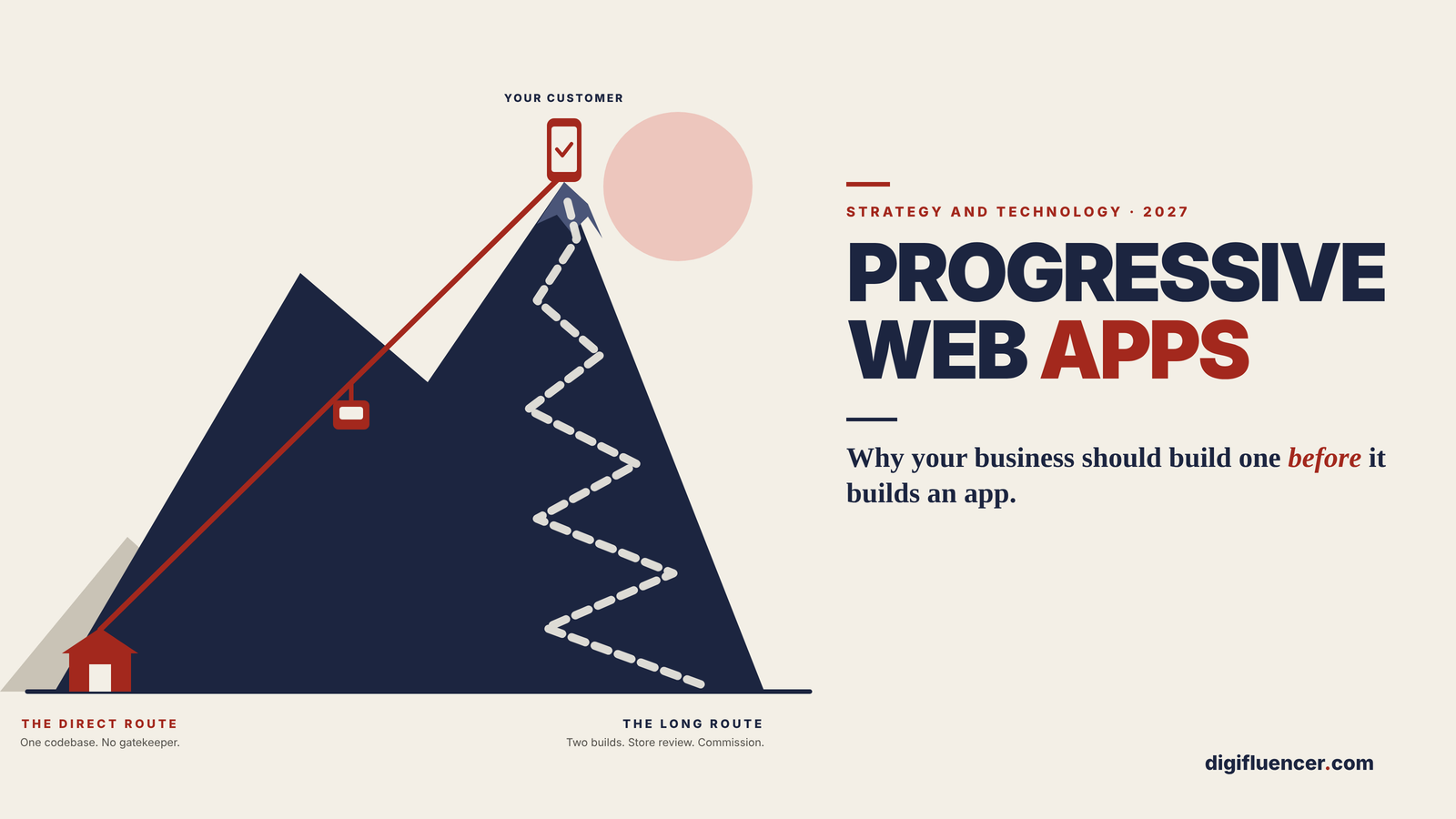
- The default answer is usually the expensive one. “We need an app” tends to mean two native builds, two release pipelines, an app store review queue and a commission on every sale. For many businesses, a progressive web app delivers the experience customers actually want at a fraction of that complexity.
- A progressive web app is a website that behaves like an app. Google describes progressive web apps as “capabilities that enable app experiences, built and deployed on the web”. They can be installed to the home screen, load fast, work with a poor or absent connection and send notifications, all from one codebase.
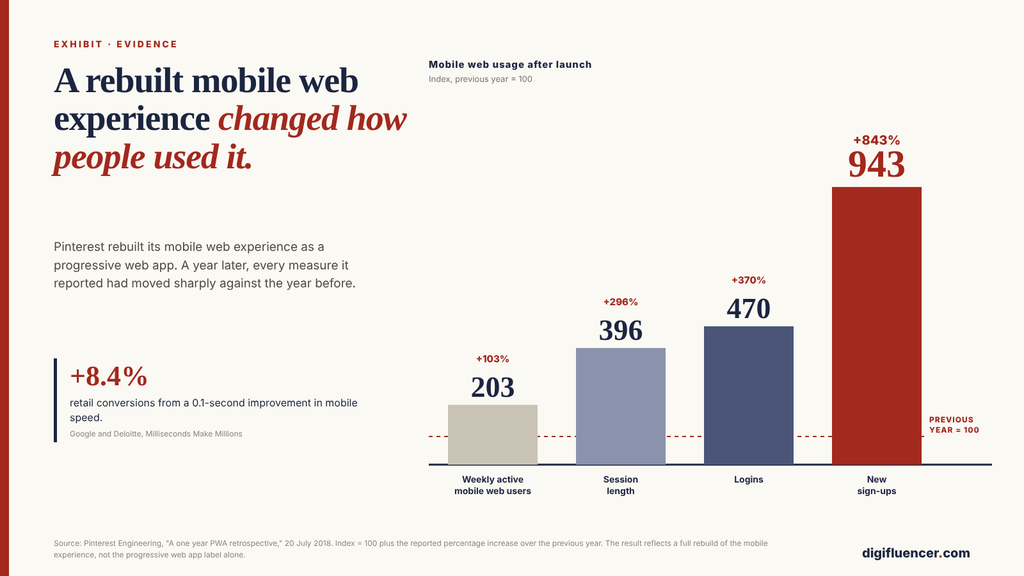
- The evidence is real, with a caveat. Pinterest’s rebuilt mobile web experience, delivered as a progressive web app, lifted session length by 296% and new sign-ups by 843% compared with the previous year (Pinterest Engineering, 2018). Those results reflect a full rebuild of the mobile experience, not the label alone.
- Our guidance. For most mid-market businesses, build the progressive web app first. Move to native when your own data shows a specific need that only native can meet. And if your mobile website is not already fast and clear, fix that before you build either.
The question behind “we need an app”
The request usually arrives dressed as a strategy. A competitor has launched an app. The board has asked why there is not one. A marketing lead has seen retention figures from a loyalty app and would like some of that.
Behind each of these sits a more useful question: what do we want customers to be able to do on their phones that they cannot do today?
Answered honestly, the list is rarely long. Return quickly to something they use often. Find what they want without waiting for a slow page. Check an order or a booking on a train with patchy signal. Get a nudge when something they care about changes. Buy again in two taps.
Every item on that list can be delivered by a progressive web app. Few of them require a native build. Yet the default path, two native apps and the organisation that supports them, is chosen first more often than the evidence justifies.
This article sets out when a progressive web app is the better first move, when it is not, and how to decide.
What a progressive web app actually is
A progressive web app, or PWA, is a website built to a modern set of standards so that it can behave like an installed app. There is no separate product to download from a store. The same site that customers find in search can be added to the home screen, opened full-screen, used in a weak connection and, on supported devices, send notifications.
Three capabilities matter most to a business:
- Installable. A customer can add the site to their home screen and open it with its own icon, without a visit to an app store.
- Reliable. A service worker, a small script that sits between the app and the network, can cache the parts of the experience a customer needs, so it opens quickly and degrades gracefully when the connection is poor. Google’s guidance on progressive web apps covers installability and offline behaviour in detail.
- Engaging. Notifications, a full-screen interface and fast, app-like navigation bring customers back and keep them in the flow.
The relationship between the three options a business actually chooses between is easiest to see side by side.
| Standard website | Progressive web app | Native app | |
|---|---|---|---|
| How customers get it | Search, links, ads | Search, links, ads, plus add to home screen | App store download |
| Codebase | One | One | Usually two (iOS and Android), or a cross-platform framework |
| Discoverable in search | Yes | Yes | No, discovered through the store |
| Works offline or on a weak connection | Rarely | Yes, by design | Yes |
| Notifications | No | Yes, on supported devices | Yes |
| Release process | Publish when ready | Publish when ready | Store review, then user updates |
| Store commission on sales | None | None | Applies where the store’s rules require it |
| Deep device access | Limited | Moderate | Full |
The pattern to notice is that a progressive web app keeps nearly all the reach of the website while adding most of what customers value in an app.
Six reasons to build the progressive web app first
1. One codebase, one team, one release pipeline
A native strategy normally means building and maintaining at least two applications, each with its own engineers, test cycles and release schedule. A progressive web app is built once and runs everywhere a modern browser does. That difference compounds. Every feature, bug fix and design change is delivered once, not twice. For a business with a small product team, it is often the difference between shipping monthly and shipping quarterly.
We are deliberately not attaching a dollar figure to this, because costs depend on scope, integrations and the quality of what already exists. What holds consistently is the direction: one codebase is cheaper to build, cheaper to change and cheaper to keep secure than two.
2. No gatekeeper between you and your customer
Publishing to an app store means accepting someone else’s review process, rules and commercial terms. Updates wait in a queue. Features can be delayed or rejected. And where the store’s rules apply, so does its commission: Apple’s reduced rate of 15% is available only to developers with under $1 million in annual proceeds, and larger businesses pay the standard rate, which is higher (Apple, Small Business Program).
A progressive web app is distributed through the web. You release when you are ready, learn from real customers the same day, and keep your pricing and checkout under your own control. For a business where the app is a sales channel, that matters.
3. Speed that customers can feel, and revenue that follows
Speed is the quiet engine behind every mobile result. Research commissioned by Google and conducted by Deloitte found that a 0.1-second improvement in mobile site speed lifted retail conversions by 8.4% (Google and Deloitte, Milliseconds Make Millions). A progressive web app is built around that discipline: cached shells, instant navigation, and assets that load before the customer asks for them.
This is also why we recommend fixing the foundations first. Our checklist of the signs your website is quietly costing you customers is a useful diagnostic. A progressive web app built on a slow, confusing site will simply be a slow, confusing app.
4. Reliable when the connection is not
Customers do not always have good signal: on trains, in lifts, in basements, in regional areas and on busy event networks. A progressive web app can keep the essentials available, such as a booking, a ticket, a product catalogue or a draft form, and synchronise when the connection returns. For service businesses, field teams and any brand whose customers are mobile by nature, this is not a nicety. It is the difference between a tool people rely on and one they abandon.
5. Notifications and a home screen presence, including on iPhone
For years, the objection to progressive web apps was that Apple’s devices could not send them notifications. That ended with iOS and iPadOS 16.4, released in 2023, which added Web Push for web apps added to the Home Screen (WebKit, February 2023). The conditions are worth knowing: the customer must add the site to their Home Screen, and the permission request must follow a direct action such as tapping a subscribe button.
That constraint is also a design principle. Notifications work best when customers have asked for them, and a well-designed progressive web app earns that permission by being useful first.
6. Discoverable, linkable and part of your growth engine
A native app lives behind a store listing. A progressive web app is a website, which means it can be found in search, shared as a link, reached from an ad, and measured with the analytics you already use. Every page is an entry point.
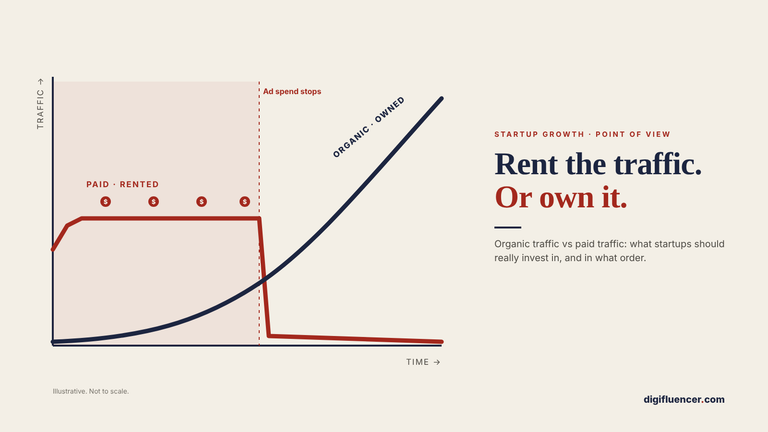
That makes it a natural partner for organic growth. Our guide to SEO strategy sets out how search visibility compounds over time, and our point of view on organic and paid traffic explains why owning that visibility matters more as paid media gets more expensive. A progressive web app gives that asset an app-like front end without breaking the link between the two.
The evidence: what Pinterest actually learned
The most-cited progressive web app case is Pinterest’s, and it is worth reading carefully because it shows both what is possible and what is easy to misread.
Pinterest rebuilt its mobile web experience as a progressive web app. In a retrospective a year after launch, the company reported, compared with the previous year (Pinterest Engineering, July 2018):
- Session length up 296%
- Pins seen up 401%
- New sign-ups up 843%
- Weekly active mobile web users up 103%, with growth of 156% in Brazil and 312% in India

Two lessons follow.
First, the headline is real. A fast, reliable, installable web experience can change how people use a product, especially for audiences on modest devices and unreliable networks.
Second, the cause is the rebuild, not the label. Pinterest redesigned the whole mobile web experience around speed, reliability and engagement. A progressive web app is the vehicle. The discipline of building for performance first is the engine. Copying the label without the discipline will not copy the result, and this is the most common way businesses are disappointed by progressive web apps.
What a progressive web app cannot do
A recommendation is only trustworthy if it is clear about its limits. There are situations where native is the right answer.
- Deep device integration. Features that depend on advanced hardware access, such as complex Bluetooth peripherals, background location tracking, certain sensors, or system-level integrations, are more reliable in native apps.
- Graphics-intensive experiences. High-end games, augmented reality and heavy real-time rendering generally belong in native.
- App store discovery as a core channel. If a large share of your customers find products by browsing a store, an absence from it is a real cost. A progressive web app cannot be found there by browsing in the same way.
- Uneven platform support. Browsers and operating systems support progressive web app features to different degrees, and behaviour on iPhone differs from behaviour on Android. A well-built progressive web app is tested on the devices your customers actually use, and designed to degrade gracefully where a feature is missing.
- Customer expectation. In some categories, such as banking and consumer subscriptions, customers expect to find a branded app in the store and may trust it more.
None of these is an argument against starting with a progressive web app. They are the signals that tell you, with evidence, when to add native later.
A decision framework: progressive web app, native, or neither
Most decisions about apps are made on instinct and competitor behaviour. We use six questions, answered with data, to make the call explicit.

Start with a progressive web app if most of these are true:
- Your core flows are content, commerce, booking, account management or service tasks.
- You want something in customers’ hands within months, not a year.
- Your customers use a mix of iPhones, Android devices and desktop.
- Search, links and ads are important ways customers find you.
- You want to learn from real usage before committing to a larger build.
Build native if one or more of these is true:
- The core value depends on deep hardware access or background capabilities.
- The experience is graphics-intensive or real-time.
- App store discovery is a primary acquisition channel for your category.
- Your own progressive web app data shows a retention or revenue gap that only native features can close.
Choose neither, for now, if:
- Your mobile website is slow, unclear or leaking customers at checkout. Fix that first. Our website launch checklist covers the foundations.
- You cannot yet say what job the app would do that the website cannot.
- You have no way to measure whether it worked.
For the large majority of mid-market businesses, the answer is the first list. Build the progressive web app first, measure it, and let your own data tell you whether native is worth adding.
Build, buy or partner: how to deliver it
Once the decision is made, the next question is how to deliver it. There are four realistic routes, each with a different balance of control, speed and cost.
Buy: use the progressive web app capability of your platform
Many commerce, content and booking platforms now offer progressive web app features or add-ons, so a business can switch on installability and basic offline behaviour without custom engineering.
Best for: a business whose needs are standard and whose platform already does the job.
Watch for: limits on customisation, performance you cannot tune, and lock-in to a vendor’s roadmap.
Build: a custom progressive web app on your own stack
A custom build gives full control over performance, design, integrations and data. It is the route for businesses where the app is a competitive asset, not a convenience.
Best for: products where experience, speed and integration with core systems create advantage.
Watch for: the need for strong in-house or partner engineering, and the temptation to build more than the first release needs.
Compose: a headless front end on your existing back end
Many businesses already have solid commerce, content or customer systems. A headless approach leaves them in place and builds a fast progressive web app front end on top, connected through APIs. It is often the best balance for retailers and publishers.
Best for: businesses with strong back-end systems and a weak front end.
Watch for: integration complexity, and the discipline needed to keep API performance high.
Partner: a team that designs, builds and runs it with you
For most businesses, the practical answer is a partner that brings design, engineering, security and growth together, builds the first release with your team, and hands over capability as it goes. Our design, engineering and growth teams work this way, with cybersecurity involved from the first line of code and AI engineering where personalisation, search or assistants earn their place.
Best for: businesses that want a defensible first release quickly and a team they can grow into.
Watch for: partners who sell hours rather than outcomes. Choose one that will agree measurable goals up front.
A simple rule works across all four routes: buy what is standard, build what differentiates, and partner for the depth you cannot afford to grow alone.
A twelve-week path to a first release
A first progressive web app does not need to be large. It needs to do one job well and be measurable. A realistic sequence looks like this.
- Weeks 1 to 2: Discover. Define the single job the app must do, the audience, and the three numbers that will show whether it works. Audit the existing mobile experience and its speed.
- Weeks 3 to 6: Build the foundation. Set up the architecture, design system, performance budgets and security baseline. Ship the core flow behind a feature flag.
- Weeks 7 to 10: Build the experience. Add installability, offline behaviour for the essential tasks, and notifications that customers opt into. Test on the real devices and networks your customers use.
- Weeks 11 to 12: Launch and learn. Release to existing customers first, with a clear reason to install. Review the three numbers weekly. Decide what to improve, and whether the data justifies anything native.
The measure of success is not that it launched. It is what customers did with it.
Five mistakes that waste a progressive web app
- Treating it as a project, not a product. A progressive web app that is launched and left will decay. Fund it with a roadmap, an owner and a monthly improvement cycle.
- Building on a slow foundation. Speed is the product. If the underlying site is slow, the app will be too.
- Asking for notification permission on first visit. Earn it by being useful first. Permission requests that arrive before value are declined, and often permanently.
- Skipping the device testing. Behaviour differs between browsers and operating systems. Test on the devices your customers actually carry.
- Copying a competitor’s feature list. Decide the one job your app must do better than anything else on the customer’s phone, and protect it from feature creep.
Security belongs on this list too, because an app is a trusted surface. The disciplines in our guide to website security for business owners apply in full, including keeping dependencies patched and controlling what third-party scripts can do.
Questions to ask before you commission anything
Whether you build in-house or with a partner, a leadership team should be able to answer these before approving the work.
- What single job will this do that our mobile website cannot?
- Which three numbers will tell us, within a quarter, whether it worked?
- How fast is our mobile experience today, measured on real devices and networks?
- What share of our customers use iPhones, Android devices and desktop?
- Does our category depend on app store discovery?
- How will customers hear about it, and why would they install it?
- Who owns it after launch, and what is the monthly improvement budget?
- What would have to be true in our data for us to add a native app later?
If several of these are hard to answer, the next investment is the clarity to answer them. That is almost always cheaper than building the wrong thing.
Not sure whether you need a progressive web app, a native app, or neither? A short conversation is usually enough to tell. We will look at your mobile experience, your customers’ devices and your goals, and give you an honest recommendation. Talk to our engineering team →
Frequently asked questions
Q: Is a progressive web app the same as a responsive website?
A: No. A responsive website adapts its layout to different screens. A progressive web app goes further: it can be installed to the home screen, load quickly from a cache, work with a poor connection and send notifications. Most progressive web apps are also responsive, but not all responsive sites are progressive web apps.
Q: Will a progressive web app work on iPhones?
A: Yes, with some differences from Android. Customers can add a progressive web app to the Home Screen, and since iOS and iPadOS 16.4 those Home Screen web apps can receive web push notifications, provided the customer grants permission after a direct action (WebKit). Support varies by feature and browser, so we test on the devices your customers actually use.
Q: Can customers find a progressive web app in the app stores?
A: Not by browsing in the usual way. Discovery happens through search, links, ads and your existing channels. If store browsing is central to how customers find businesses like yours, that is a signal to consider native, and it is exactly the kind of evidence that should drive the decision.
Q: Is a progressive web app cheaper than a native app?
A: Usually, because one codebase replaces two and there is no store review or commission on sales that fall outside the store’s rules. The actual figure depends on scope, integrations and the quality of what already exists, so we scope it against your goals rather than quote a universal number.
Q: Can we start with a progressive web app and add native later?
A: Yes, and it is often the smartest path. The product decisions, design system, APIs and data you build for the progressive web app carry over. Your usage data then tells you whether a native app is worth the investment, and which features justify it.
Q: How do we know if our current website is ready?
A: Test it on a mid-range phone on a mobile connection. If it is slow, hard to navigate or leaks customers at checkout, fix that first. A progressive web app amplifies the quality of the experience underneath it, good or bad.
Q: Does a progressive web app help with SEO?
A: It can, because it is a website. Pages remain indexable and shareable, and the speed and reliability that progressive web apps encourage are the same qualities search engines reward. The structure, content and technical SEO still need to be right, as set out in our SEO guide.
The bottom line
The question “do we need an app?” is really “how do we give customers a better mobile experience, and what is the smartest way to build it?” For most businesses, the smartest first answer is a progressive web app: one codebase, no gatekeeper, fast, installable and reliable, and part of the web you already own.
The businesses that get the most from it do not treat it as a smaller native app. They treat it as a product, built around speed, measured against a clear job, and improved every month. And they let their own data, not a competitor’s launch, tell them when native is worth adding.
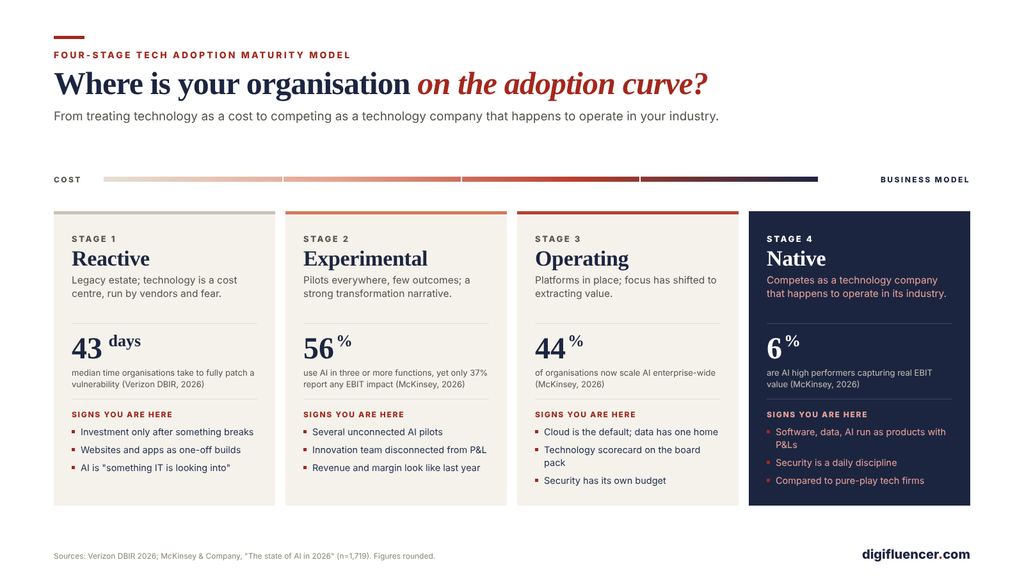
As we argued in our point of view that every industry is now a technology industry, the winners are the organisations that treat software as part of how they serve customers. A progressive web app is one of the most practical places to start.
Digifluencer designs, builds and secures web and mobile products for growing businesses. Our design, engineering, cybersecurity, AI engineering and growth teams work as one, so that the product, the website and the marketing behind it pull in the same direction and every investment ties to a business outcome.
If you are weighing a progressive web app against a native build, we would be glad to help you think it through. In a Progressive Web App Readiness Review, we look at your mobile experience, your customers’ devices and your goals, and recommend whether to build a progressive web app, go native or fix the foundations first. There is no obligation, and you keep the recommendations whatever you decide.
Book your Progressive Web App Readiness Review →
Sources
- Google, “Progressive web apps,” web.dev. https://web.dev/explore/progressive-web-apps
- Pinterest Engineering, “A one year PWA retrospective,” 20 July 2018. https://medium.com/pinterest-engineering/a-one-year-pwa-retrospective-f4a2f4129e05
- WebKit, “Web Push for Web Apps on iOS and iPadOS,” 16 February 2023. https://webkit.org/blog/13878/web-push-for-web-apps-on-ios-and-ipados/
- Google and Deloitte, “Milliseconds Make Millions,” published on web.dev. https://web.dev/case-studies/milliseconds-make-millions
- Apple, “App Store Small Business Program.” https://developer.apple.com/app-store/small-business-program/