Website security advice is usually written by specialists, for specialists. This guide is written for the people who own the risk: founders, managing directors, finance leads and marketing heads who need to know what matters, what to ask for and what good looks like, without learning to code.
At a glance
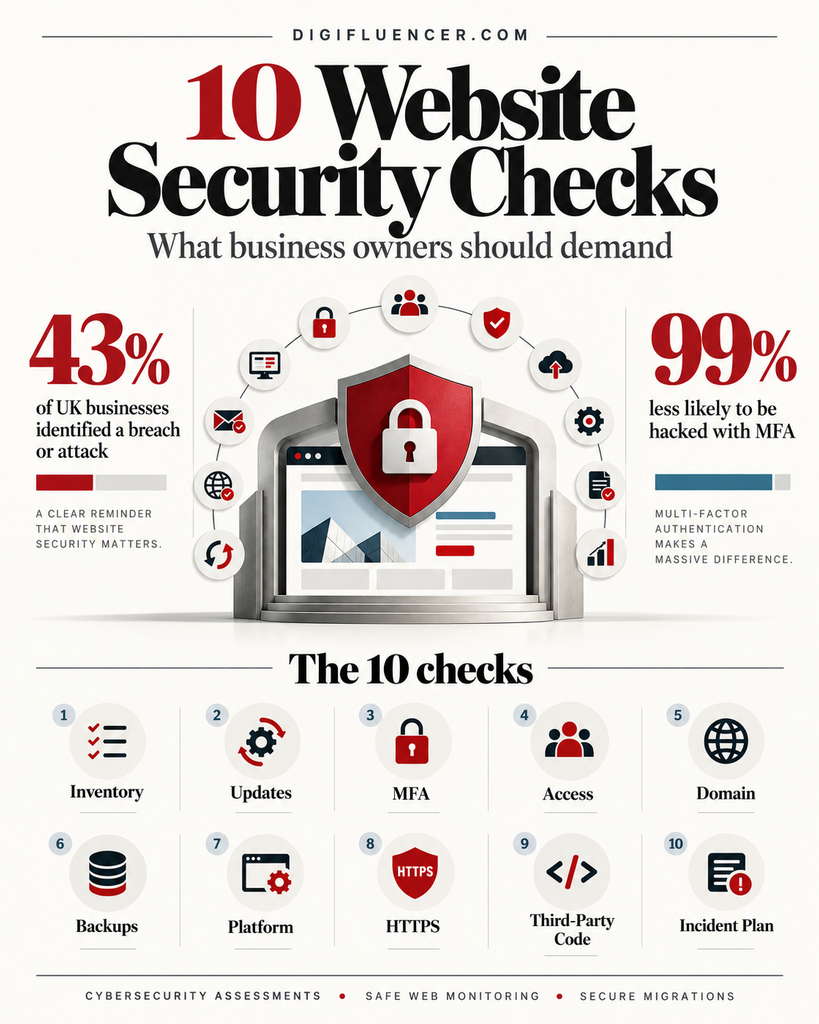
- You are not too small to be a target. Most attacks on websites are automated. Software scans the internet for known weaknesses and exploits whatever it finds, regardless of who owns the site. In the UK, 43% of businesses identified a breach or attack in the past year (UK Government, 2026).
- A small number of controls prevent most attacks. Government schemes such as the UK’s Cyber Essentials are built on the same principle: a handful of basics, done consistently, defend against the most common threats (NCSC).
- Our point of view: business owners do not need to understand how attacks work. They need to make sure ten things are owned, done and checked. We set out those ten, what you can safely deprioritise, a one-page scorecard and the questions to put to your developer, agency and host.
Why most website security advice misses the business owner
Ask for website security advice and you will be offered firewalls, scanners, certificates, plugins, penetration tests and a vocabulary that makes the subject sound impossible for anyone without a technical background.
The result is predictable. Many business owners conclude that security is something their developer or hosting company “handles”, and stop asking questions. The UK Government’s latest survey found that only 31% of businesses have a board member or trustee responsible for cyber security, and just 17% are aware of Cyber Essentials, the government-backed scheme designed for exactly this audience (UK Government, 2026).
Meanwhile, the threat has accelerated. When critical flaws in PHP, the language behind most of the web, were disclosed in October 2026, attack attempts had already begun before the public announcement and passed one million within days. We documented the response in our briefing on PHP security vulnerabilities. The gap between a weakness becoming known and attackers exploiting it is now measured in hours.
The good news is that the fundamentals have not changed. The guidance from national bodies such as the UK’s National Cyber Security Centre (NCSC), the US Cybersecurity and Infrastructure Security Agency (CISA) and the US National Institute of Standards and Technology (NIST) converges on the same small set of priorities. What follows translates them into ten things a business owner can own.
The ten things that actually matter
1. Know everything you own
You cannot protect a website you have forgotten about. Yet most organisations that have been online for more than a few years have accumulated more than they realise: old campaign sites, staging copies, a booking system on a subdomain, a domain registered for a product that never launched.
Forgotten properties are exactly where attackers look, because no one is updating them. During the PHP2Shell response, the hardest part for many organisations was simply finding every site that needed fixing.
What good looks like: a single list of every website, domain, subdomain and web application you operate, with the platform it runs on, who hosts it, who maintains it and who in the business owns it. Anything with no owner and no purpose should be retired.
Ask your team: “Can you send me the complete list of every website and domain we own, and who is responsible for each?”
2. Keep everything updated, and fast
The single most important technical control is applying security updates promptly. Most website compromises exploit weaknesses for which a fix already exists but has not been installed. This applies to every layer: the server, the programming language (such as PHP), the content management system (such as WordPress), and every plugin and theme.
Speed matters as much as consistency. A monthly update routine was once adequate. Today, a critical flaw can be exploited at scale within a day of disclosure. CISA maintains a public catalogue of vulnerabilities known to be actively exploited, and treats them as priorities for immediate action (CISA Known Exploited Vulnerabilities Catalog).
What good looks like: routine updates applied at least weekly, and critical security updates applied within 24 to 48 hours for any site that takes payments, captures personal data or generates significant revenue.
Ask your team: “If a critical vulnerability affecting our site is announced on a Friday night, when would it be fixed?”
3. Turn on multi-factor authentication everywhere that matters
Stolen and guessed passwords remain one of the easiest ways into a website. Multi-factor authentication (MFA) requires a second proof of identity, such as a code from an app or a physical security key, in addition to the password. CISA states that using MFA makes you 99% less likely to be hacked (CISA).
The accounts that matter most are not only the website’s admin login. They include every account that could be used to take control of the website indirectly:
- Website administrator accounts (WordPress, Shopify, Drupal and similar)
- Hosting and server control panels
- Domain registrar and DNS provider
- Business email, especially the inboxes used to reset other passwords
- Payment, analytics and advertising accounts
What good looks like: MFA enforced, not merely available, on every account in the list above, for every user. Where possible, use an authenticator app or security key rather than text messages.
Ask your team: “Is MFA switched on and enforced for every person who can log in to our website, hosting, domain and email?”
4. Control who has access, and remove it when they leave
Websites accumulate users. Former employees, past agencies, freelancers who built a landing page three years ago and plugin vendors given temporary access all tend to keep their accounts long after the work is done. Each one is a door that someone else could open.
The principle, which the NCSC builds into Cyber Essentials as “user access control”, is simple: give people only the access they need, for only as long as they need it (NCSC).
The same discipline now applies to software. AI agents and automated tools that publish content, answer customers or update systems are users too, often with broad permissions. We set out how to govern them in our point of view on agentic AI security.
What good looks like: every person has their own named account (no shared logins), administrator rights are limited to the few who need them, and access is reviewed every quarter and removed on the day someone leaves or an engagement ends.
Ask your team: “Who currently has administrator access to our website, and when did we last remove someone?”
5. Protect your domain and email
Your domain name is the foundation of your online identity. If it lapses or is hijacked, attackers can take over your website and your email at the same time. If it is easy to spoof, criminals can send convincing emails that appear to come from you.
Three protections matter:
- Domain control. Domains should be registered to the business, not to an individual or agency, with auto-renewal, current payment details and a registrar lock that prevents unauthorised transfers.
- Email authentication. SPF, DKIM and DMARC are settings that tell inbox providers which servers may send email for your domain. Google now requires bulk senders to Gmail to use all three (Gmail Help). A DMARC policy set to “quarantine” or “reject” makes your domain much harder to impersonate.
- Inbox security. The email accounts used to reset passwords for your website, hosting and registrar should be the best-protected accounts in the business. The NCSC’s guidance for small organisations includes a dedicated section on securing email (NCSC).
This is not only a security issue. Email authentication directly affects whether your marketing and sales emails reach the inbox. We explore that connection in why a compromised website is a marketing problem, not just an IT problem.
Ask your team: “Who is our domain registered to, is it set to auto-renew and locked, and is DMARC enforced?”
6. Back up, and prove you can restore
Backups are the difference between an incident that costs an afternoon and one that costs the business. Ransomware, a failed update, an accidental deletion or a hosting failure can all take a website down. A recent, clean backup is often the fastest route back.
But a backup that has never been restored is an assumption, not a safeguard. Backups stored on the same server as the website can be encrypted or deleted along with it. The NCSC advises small organisations to keep backup storage disconnected from the systems it protects when not in use, to combine more than one backup method so a single failure cannot destroy every copy, and to check that they know how to restore (NCSC).
What good looks like: automatic daily backups of both files and database, stored in a separate location from the live site, kept for at least 30 days, with a full test restore carried out at least once a year.
Ask your team: “When did we last restore our website from a backup, and how long did it take?”
7. Choose your platform and hosting deliberately
Every piece of software has a support lifespan. When it ends, security fixes stop, and the next serious flaw may never be patched. PHP 8.1 and earlier versions are already out of official support, and PHP 8.2 reaches end of security support on 31 December 2026 (PHP.net). The same applies to content management systems, plugins and server operating systems.
Hosting choices matter too. Managed hosting can take care of server updates and monitoring, but no host secures the plugins, accounts and content you add. Security remains a shared responsibility, and it is worth being clear about where the host’s job ends and yours begins.
If your website runs on an ageing platform that is difficult to update, the answer is rarely a risky rebuild. Our guide to legacy modernisation sets out how to replace older systems in phases without disrupting the business. For organisations planning a new site, our guide to building a website for a consulting business covers platform and hosting choices that apply well beyond consulting.
What good looks like: every component on a version that is currently supported, a written note of when each reaches end of life, and a hosting agreement that states clearly what the provider does and does not do for security.
Ask your team: “Is any part of our website running on software that is out of support, or will be within the next 12 months?”
8. Encrypt every connection and put a shield in front
Two protections should be standard on every business website.
HTTPS encrypts the connection between your visitors and your site, protecting the data they submit. Browsers flag sites without it as “Not secure”, and Google’s page experience guidance includes serving pages securely over HTTPS (Google Search Central). Free, automatically renewing certificates mean there is no reason for any page to be without it.
A web application firewall (WAF) sits in front of the website and blocks known attack patterns before they reach it. Many hosting and content delivery providers include one. A WAF is particularly valuable in the hours between a vulnerability being announced and a fix being installed.
Treat a WAF as a seatbelt, not a substitute for driving carefully. During the PHP2Shell response, attackers adapted their methods to get around firewall rules within days. Updates remain the only complete fix.
What good looks like: HTTPS on every page of every site, with automatic certificate renewal; a WAF switched on and kept up to date for any site that handles personal data or payments.
9. Govern the third-party code on your site
Most of the code running on a modern business website was not written for that business. Plugins, themes, analytics tags, chat widgets, booking tools, advertising pixels and payment scripts all come from third parties, each updated on its own timetable and each with some level of access to your site or your visitors.
This is where many compromises begin. A single abandoned plugin, or a script loaded from a service that is itself compromised, can expose every visitor. For businesses that take card payments, the rules have tightened: PCI DSS v4.0.1 requires organisations in scope to authorise, inventory and monitor the scripts running on payment pages (PCI Security Standards Council).
The OWASP Top 10, the widely used standard list of critical web application security risks, includes the use of vulnerable and outdated components among its core concerns. Your developer should know it well.
What good looks like: a current list of every plugin and third-party script, with a business reason for each; nothing installed from unknown sources; anything unused removed; and a simple approval step before anything new is added to pages that collect personal or payment data.
Ask your team: “How many plugins and third-party scripts does our site run, and which could we remove?”
10. Have a plan for the bad day
Even well-protected websites can be compromised. What separates a minor incident from a crisis is usually preparation: knowing who to call, what to do first and what you are legally obliged to do.
A website incident plan does not need to be long. It needs to answer five questions:
- Who decides? One named person with authority to take the site offline.
- Who fixes? Contact details for your developer, host and any security partner, including out of hours.
- What first? Contain the problem, preserve evidence, change passwords and restore from a clean backup.
- Who must be told? Under the EU and UK GDPR, a personal data breach that poses a risk to individuals must be reported to the regulator within 72 hours of becoming aware of it (GDPR, Article 33). In India, CERT-In requires specified incidents, including website compromises, to be reported within 6 hours (CERT-In). In the United States, the FBI asks victims to report cyber crime through its Internet Crime Complaint Center (IC3).
- How do we protect the brand? Pausing campaigns, briefing customer-facing staff and checking whether search engines or browsers are warning visitors.
Google Search Console is worth setting up for this reason alone. Its Security Issues report alerts you if Google detects that your site has been hacked or is serving harmful content, often before you would notice yourself (Google Search Console). Our companion article includes a full 72-hour response playbook for marketing and technology teams.
Ask your team: “If our website were hacked tonight, who would we call, and who would decide what to tell customers?”
What you can safely deprioritise
Part of good security is knowing what not to spend money and attention on. These are the areas where we most often see business owners over-invest relative to the ten priorities above.
| Common focus | Why it matters less than you think | What to do instead |
|---|---|---|
| Forcing regular password changes | NIST’s digital identity guidelines state that organisations should not require periodic password changes unless there is evidence of compromise, and should favour length over complexity rules (NIST SP 800-63B) | Use long, unique passwords stored in a password manager, with MFA |
| Security badges and trust seals | A badge on the footer does not secure anything behind it | Invest in the controls the badge implies |
| Hiding the login page | Moving the admin URL reduces noise but does not stop a determined or automated attacker | Enforce MFA and limit login attempts |
| Buying more security tools | Overlapping plugins and services add complexity, cost and sometimes new vulnerabilities | Make sure the basics are owned and working first |
| An annual penetration test on its own | A point-in-time test is valuable, but a site can become vulnerable the day after | Pair testing with continuous updating and monitoring |
The one-page website security scorecard
Use this scorecard to check where your website stands today. Any “No” or “Not sure” is a priority.
| # | Priority | The question to ask | Yes / No / Not sure |
|---|---|---|---|
| 1 | Know what you own | Do we have a complete list of every site and domain, with an owner for each? | |
| 2 | Update fast | Are critical security updates applied within 48 hours? | |
| 3 | Multi-factor authentication | Is MFA enforced on website, hosting, domain and email accounts for every user? | |
| 4 | Access control | Has administrator access been reviewed in the last three months? | |
| 5 | Domain and email | Is our domain business-owned, auto-renewing and locked, with DMARC enforced? | |
| 6 | Backups | Have we successfully restored from a backup in the last 12 months? | |
| 7 | Supported platform | Is every component of our site on a supported version? | |
| 8 | HTTPS and WAF | Is every page on HTTPS, with a web application firewall in place? | |
| 9 | Third-party code | Do we have a current list of every plugin and script, with a reason for each? | |
| 10 | Incident plan | Do we know who decides, who fixes and who must be told if we are hacked? |
Scorecard and targets are Digifluencer guidance, aligned with NCSC, CISA and NIST recommendations.
A business that can answer “Yes” to all ten has addressed the causes of most website compromises. It is not invulnerable, but it is no longer the easy target that automated attacks are looking for.
Working with your developer, agency and host
Most business owners rely on others for the technical work. That is sensible, but responsibility cannot be outsourced along with the tasks. Three practices make those relationships work.
Put security in writing. Your maintenance or support agreement should state how quickly security updates are applied, who monitors the site, how backups are taken and tested, and what happens in an incident. If it says none of these things, that is your answer.
Ask for evidence, not reassurance. A monthly or quarterly report should show what was updated, what was found and what was fixed. “Everything is fine” is not a report.
Fund it properly. Security that depends on goodwill or spare time will be done last. Our point of view on website maintenance cost sets out how to size investment against what the website actually carries, and why the cheapest option is rarely the least expensive.
Frequently asked questions
Is my small business website really at risk?
Yes. Most website attacks are automated and indiscriminate. Software scans millions of sites for known weaknesses, such as outdated plugins or weak passwords, and exploits whatever it finds. The size of the business is irrelevant to the scanner. Smaller sites are often easier targets because they are updated less frequently.
What is the most important thing I can do to secure my website?
Keep everything updated promptly and turn on multi-factor authentication for every account that can control the site, including hosting, domain and email. Together, these two measures close the routes used in a large share of website compromises.
Is WordPress secure enough for a business website?
WordPress core is actively maintained and can be run securely. Most WordPress compromises come from outdated or poorly maintained plugins and themes, weak passwords and unsupported server software, rather than from WordPress itself. The ten priorities in this guide apply directly.
Does my hosting company handle website security?
Partly. Hosts are typically responsible for the physical servers and network, and managed hosts may also update the server software. You remain responsible for your accounts, your content management system, plugins, third-party scripts and data. Check your hosting agreement to see exactly where the line sits.
How much should website security cost?
It depends on what the website carries. A brochure site and an online shop with thousands of customer records have very different risk profiles. Our guidance on website maintenance cost explains how to size investment against value at risk.
What should I do if I think my website has been hacked?
Act quickly and in order: contain the problem (take the site offline if necessary), change passwords for all website, hosting, domain and email accounts, contact your developer or security partner, preserve evidence, and check whether you have legal obligations to report the incident. Our briefing on PHP security vulnerabilities includes a detailed guide to what to look for and who to notify.
Conclusion: security is an ownership question
Website security is often presented as a technical challenge. For most businesses, it is an ownership challenge. The controls that prevent most attacks are well understood, widely recommended and affordable. What is usually missing is someone who makes sure they are done, checked and funded.
Business owners do not need to become experts. They need to ask the right ten questions, expect clear answers and treat their website with the same seriousness as any other asset that carries the company’s revenue, data and reputation.
Digifluencer helps business owners secure their websites without the jargon. Our cybersecurity assessments show exactly where your websites and accounts are exposed and what to fix first. Our Safe Web service keeps them updated, backed up, monitored and reported on. And when older platforms need replacing, our engineering team handles migration end to end.
Book a website security assessment →
Further reading from Digifluencer
- Why a Compromised Website Is a Marketing Problem, Not Just an IT Problem
- PHP Security Vulnerabilities: What Every Business Website Owner Must Do Now
- Website Maintenance Cost: Why Leaders Should Fund Digital Resilience, Not Upkeep
- Legacy Modernisation Without Disruption: A Leader’s Guide
- Securing the Agentic Enterprise: What Leaders Must Govern Before AI Acts on Their Behalf
- The Backbone of Digital Marketing: A Complete Guide to SEO
- Website for a Consulting Business: The Leader’s Guide
Sources
- UK Department for Science, Innovation and Technology, “Cyber Security Breaches Survey 2025/2026,” 30 April 2026. https://www.gov.uk/government/statistics/cyber-security-breaches-survey-20252026/cyber-security-breaches-survey-20252026
- National Cyber Security Centre (UK), “Cyber Essentials.” https://www.ncsc.gov.uk/cyberessentials/overview
- National Cyber Security Centre (UK), “Small organisations guide to cyber security.” https://www.ncsc.gov.uk/collection/small-organisations-guide-to-cyber-security
- Cybersecurity and Infrastructure Security Agency (US), “Multifactor Authentication.” https://www.cisa.gov/topics/cybersecurity-best-practices/multifactor-authentication
- Cybersecurity and Infrastructure Security Agency (US), “Known Exploited Vulnerabilities Catalog.” https://www.cisa.gov/known-exploited-vulnerabilities-catalog
- National Institute of Standards and Technology (US), SP 800-63B, “Digital Identity Guidelines: Authentication and Authenticator Management.” https://pages.nist.gov/800-63-4/sp800-63b.html
- OWASP Foundation, “OWASP Top Ten.” https://owasp.org/www-project-top-ten/
- PHP Group, “Supported Versions.” https://www.php.net/supported-versions.php
- PCI Security Standards Council, PCI DSS v4.0.1. https://www.pcisecuritystandards.org/
- Google Search Central, “Understanding page experience in Google Search results.” https://developers.google.com/search/docs/appearance/page-experience
- Google Search Console, “Security Issues report.” https://search.google.com/search-console/security-issues
- Gmail Help, “Email sender guidelines.” https://support.google.com/a/answer/81126?hl=en
- Regulation (EU) 2016/679 (General Data Protection Regulation), Article 33. https://eur-lex.europa.eu/eli/reg/2016/679/oj
- CERT-In, Directions under Section 70B(6) of the IT Act, 2022. https://www.cert-in.org.in/
- FBI Internet Crime Complaint Center. https://www.ic3.gov/