A budgeting guide for chief executives, finance directors, marketing leaders and IT owners who are setting next year’s numbers and want to know what website maintenance should cost, and what happens if they spend too little.
Executive summary
Most organisations budget for their website the way they budget for a new office: a large, visible cost when it is built, then very little afterwards. That habit made some sense when a website was a brochure. It makes no sense now that the website takes payments, captures leads, holds customer data and runs on hundreds of third-party components that change every week.
The question leaders usually ask is “what does website maintenance cost?” The more useful question is “what are we insuring against, and how much cover do we need?” Because that is what maintenance is: an insurance policy against outages, breaches, regulatory penalties and the slow commercial decline of a site that is falling behind.
The evidence for treating it that way has never been stronger:
- The average data breach now costs $4.99 million globally, a record and a 12% rise on the year before. In the United States the average is $11.5 million (IBM Cost of a Data Breach Report 2026, via eSecurity Planet).
- Exploiting unpatched software is now the most common way attackers get in, behind roughly 31% of breaches, overtaking stolen credentials for the first time (Verizon DBIR 2026, via SecurityWeek).
- The window to patch is measured in hours, not weeks. For the most heavily targeted WordPress flaws, the median time from disclosure to mass exploitation was five hours (Patchstack, State of WordPress Security in 2026).
- Downtime is expensive at every scale. Splunk and Oxford Economics put the average cost of unplanned downtime for the world’s largest companies at $15,000 per minute (Cisco/Splunk, May 2026).
This guide sets out four maintenance tiers, from essential care for a simple brochure site to mission-critical support for platforms that carry revenue. For each one it shows the indicative cost, what that money buys and which risks it covers. It closes with a step-by-step method for setting your 2027 budget and a checklist you can take into your next planning meeting.
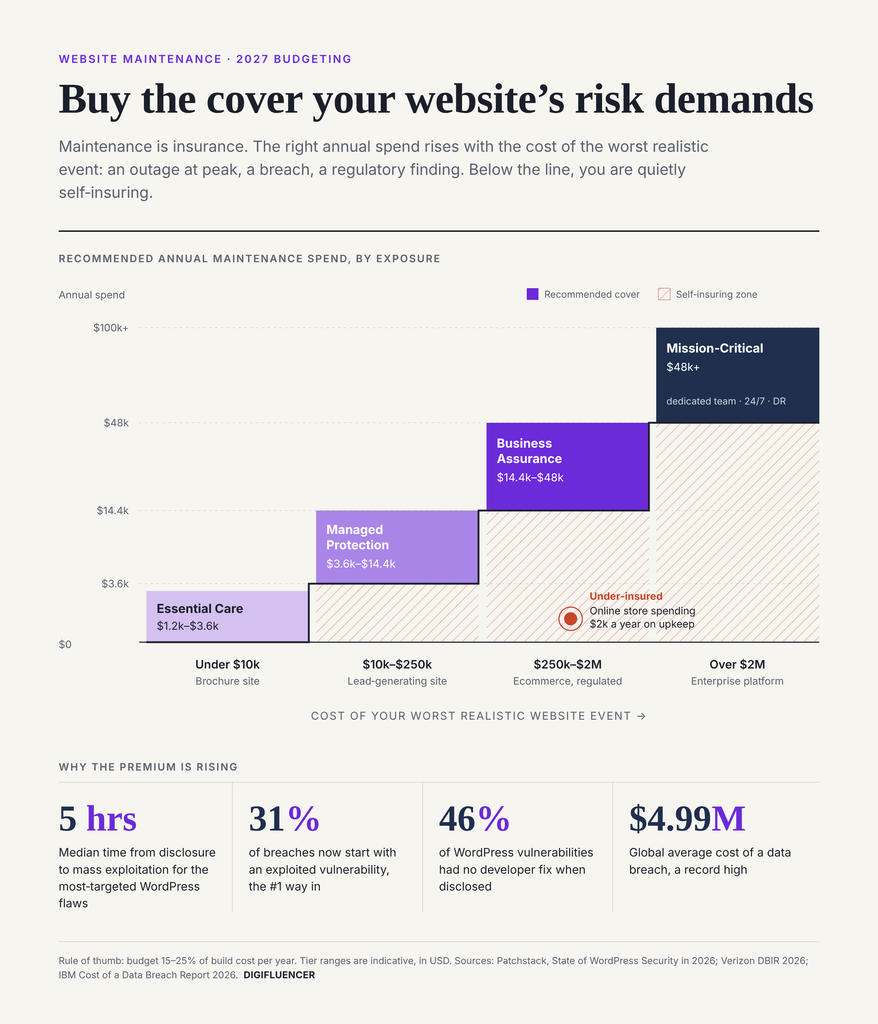
The short answer: for 2027, most organisations should plan to spend between $1,200 and $60,000+ a year on website maintenance, depending on how much revenue, data and reputation the site carries. A useful planning benchmark is 15 to 25% of the original build cost each year. Spend less than that on a business-critical site and you are not saving money. You are self-insuring, often without realising it.
Part 1: Why maintenance is risk insurance, not an IT overhead
The website you launched is not the website you own today
A modern website is not a single piece of software. It is an assembly: a content management system, a programming language runtime such as PHP, a web server, a database, a hosting platform, an SSL certificate, payment and analytics scripts, and, on a typical WordPress site, dozens of plugins written by different vendors on different release schedules.
Every one of those components is updated, deprecated and occasionally found to be vulnerable, whether or not anyone at your organisation is watching. The scale is striking. In 2025 alone, 11,334 new vulnerabilities were reported in the WordPress ecosystem, a 42% increase on the year before. 91% were in plugins, and 46% had no fix available from the developer at the moment they were made public (Patchstack).
In other words, the site you signed off at launch begins to drift the day it goes live. Maintenance is the discipline of keeping it where you left it, and then moving it forward.
The risk register your website belongs on
Leaders already understand insurance. They insure buildings against fire and directors against liability, and they size that cover against the cost of the event. The same logic applies to the website. There are five risks a maintenance budget insures against:
| Risk | What it looks like | Why it is getting worse |
|---|---|---|
| Security breach | Stolen customer data, malware served to visitors, card skimming on checkout pages, a defaced homepage | Vulnerability exploitation is now the leading breach vector, and ransomware is involved in 48% of confirmed breaches (Verizon DBIR 2026) |
| Downtime | The site is slow, broken or offline; forms and checkouts fail silently | Third-party and SaaS dependencies multiply the points of failure |
| Regulatory exposure | Accessibility complaints, data protection findings, payment card compliance failures | The European Accessibility Act has applied since 28 June 2025, and PCI DSS 4.0 now requires monitoring of payment page scripts |
| Platform obsolescence | Running software its vendor no longer supports, so the next critical flaw has no fix | PHP 8.1 and older are already out of support; PHP 8.2 reaches end of life on 31 December 2026 |
| Commercial decay | Slower pages, falling search visibility, broken journeys, outdated content | Speed and experience are directly tied to conversion, and search engines increasingly reward sites that perform |
The first four are the risks that make headlines. The fifth is the one that quietly costs the most, because it never triggers an incident report.
What under-insurance looks like in practice
October 2026 has provided an unusually clear demonstration. The PHP2Shell vulnerabilities, disclosed on 21 October, affect nearly every version of PHP, the language behind most of the web’s business websites. Exploitation attempts began before public disclosure, and authorities advised organisations that could not patch to take systems offline. (We cover it in full in our guide to PHP security vulnerabilities.)
For organisations with an active maintenance arrangement, PHP2Shell meant a scheduled emergency patch, a verification check and a short note to leadership. For those without one, it meant a scramble to find out what version of PHP they were running, who had the server credentials and whether anyone was available to do the work, while attackers were already scanning.
That difference is what you are paying for.
The upside: maintenance also protects revenue
Insurance is the floor, not the ceiling. The same work that keeps a site safe also keeps it fast and effective. Research by Google and Deloitte found that a 0.1-second improvement in mobile site speed increased retail conversions by 8.4% and travel conversions by 10.1%, and lifted progression to lead-generation forms by 21.6% (Google and Deloitte, “Milliseconds Make Millions”).
Well-run maintenance programmes therefore pay for themselves twice: once in losses avoided, and again in performance gained.
Part 2: What drives website maintenance cost
Before looking at tiers, it helps to understand why two websites that look similar can cost very different amounts to maintain. Six factors account for most of the difference.
1. What the site does. A five-page brochure site and an ecommerce platform taking thousands of orders a day are not the same asset. Every transaction, login and integration adds both value and attack surface.
2. How it is built. Sites built on hosted website builders shift much of the maintenance burden to the platform vendor. Open-source CMS sites (WordPress, Drupal, Joomla, Magento) give you more control but more responsibility. Custom applications need engineers who understand that specific codebase.
3. How many components it depends on. Each plugin, theme, library and third-party script is something to update, test and monitor. A WordPress site with 40 plugins carries meaningfully more maintenance load than one with 10.
4. What data it holds. Personal data, health information and payment details bring legal obligations and raise the cost of getting it wrong. Sites that handle card payments fall under PCI DSS, whose version 4.0 requirements, now in force, include inventorying and monitoring every script that runs on payment pages.
5. How much downtime you can tolerate. If an outage overnight is an inconvenience, standard business-hours support is fine. If an hour offline means lost sales or a missed regulatory obligation, you need round-the-clock monitoring and guaranteed response times, and those cost more.
6. How much the site needs to change. A site that is simply kept running needs far less than one that is expected to publish new campaigns, launch landing pages, test conversion improvements and grow search traffic every month.
Part 3: The four tiers of website maintenance
The tiers below reflect typical market pricing for professional maintenance in 2026, drawn from published agency rates (WebFX, WebsiteSetup) and our own delivery experience. They are indicative ranges in US dollars and exclude major redevelopment. Your actual cost will depend on the six factors above.
At a glance
| Tier | Best for | Indicative cost per month | Indicative cost per year | Risk it insures against |
|---|---|---|---|---|
| 1. Essential Care | Brochure sites, small firms, low transaction volume | $100 to $300 | $1,200 to $3,600 | Known vulnerabilities, expired certificates, data loss |
| 2. Managed Protection | Lead-generating corporate sites, professional services, growing SMBs | $300 to $1,200 | $3,600 to $14,400 | Active attacks, downtime, slow decay of performance |
| 3. Business Assurance | Ecommerce, member portals, regulated sectors, sites central to revenue | $1,200 to $4,000 | $14,400 to $48,000 | Breach, compliance failure, revenue loss from outages |
| 4. Mission-Critical | Enterprise platforms, high-volume transactions, multi-site estates | $4,000+ | $48,000+ | Material business disruption, regulatory and reputational events |
Tier 1: Essential Care
What it buys
- Managed hosting, SSL certificate and domain renewals
- Regular updates to the CMS core, plugins and themes, applied after a basic compatibility check
- Automated daily backups stored off the server, with a tested restore at least once a year
- Uptime monitoring with email alerts
- Malware scanning and a basic web application firewall
- A small allowance of content edits each month
What it does not buy
Guaranteed response times, out-of-hours support, proactive security hardening, performance optimisation or any meaningful development time.
Who it suits
Organisations whose website is a credible shop window but not a sales channel. If the site went down for a day, it would be embarrassing rather than expensive.
The risk you are still carrying
You are protected against the most common, automated attacks on known vulnerabilities, provided updates are applied quickly. You are not well protected against fast-moving incidents like PHP2Shell, where the gap between disclosure and exploitation is measured in hours.
Tier 2: Managed Protection
What it buys
Everything in Essential Care, plus:
- Updates tested on a staging copy of the site before going live, so an update does not break a form or a page
- Emergency patching for critical vulnerabilities, typically within 24 to 48 hours of disclosure
- Virtual patching through a managed firewall, which blocks exploitation of a flaw before the vendor releases a fix (important when, as Patchstack found, almost half of WordPress vulnerabilities have no fix at disclosure)
- Security hardening: least-privilege user accounts, multi-factor authentication for administrators, removal of unused plugins
- Quarterly performance reviews against Core Web Vitals
- Monthly reporting on updates, incidents, uptime and speed
- A set number of support or development hours each month, typically 2 to 8
Who it suits
Organisations whose website generates leads and shapes how buyers see them: professional services firms, B2B companies, healthcare practices, education providers and growing SMBs. This is the tier we recommend as the minimum for any site that collects personal data through forms.
The risk you are still carrying
Response is fast during business hours but may not be overnight or at weekends. Compliance is supported but not formally evidenced.
Tier 3: Business Assurance
What it buys
Everything in Managed Protection, plus:
- 24/7 monitoring with defined response times written into a service level agreement
- Incident response planning and a named team that will execute it
- Regular vulnerability scanning and an annual penetration test
- Compliance support: accessibility audits against WCAG 2.2, PCI DSS 4.0 payment page script monitoring, privacy and cookie consent reviews
- Platform lifecycle management, including planned upgrades of PHP, databases and the CMS before they reach end of life
- Conversion and performance optimisation as an ongoing workstream, not an occasional project
- A larger development allowance, typically 10 to 30 hours a month
Who it suits
Ecommerce businesses, membership and subscription platforms, financial and healthcare organisations, and any business where the website directly carries revenue or regulated data.
Why this tier often costs less than it appears
Compare the annual cost of this tier with the downside it covers. A single serious breach, the cost of a regulatory complaint, or a weekend outage during a peak trading period will usually exceed several years of maintenance spend. IBM’s data shows organisations that make extensive use of security AI and automation, the kind of tooling built into this tier, cut average breach costs by $1.93 million and contained breaches 65 days faster (IBM 2026, via eSecurity Planet).
Tier 4: Mission-Critical
What it buys
Everything in Business Assurance, plus:
- A dedicated or embedded engineering team that knows the platform in depth
- High-availability architecture with failover, load balancing and content delivery networks
- Continuous security testing and integration with the organisation’s security operations
- Formal change management, release pipelines and automated regression testing
- Disaster recovery with defined recovery time and recovery point objectives, tested regularly
- Governance reporting suitable for boards, auditors and regulators
- Roadmap delivery: new features, integrations and experience improvements on an agreed cadence
Who it suits
Enterprises and high-growth businesses whose digital platforms are the business: high-volume retailers, marketplaces, financial services, travel, media and organisations running estates of many sites across brands and markets.
How to think about the cost
At this scale, the comparison is no longer with a cheaper maintenance plan. It is with the cost of an hour of downtime and the cost of hiring and retaining an equivalent in-house team. For the largest organisations, Splunk’s research puts unplanned downtime at around $15,000 per minute (Cisco/Splunk). Against that figure, mission-critical support is one of the easier lines in the budget to defend.
Part 4: The line items in a 2027 website budget
Whatever tier you choose, the budget breaks down into the same building blocks. Use this as a template.
| Line item | Typical annual range | Notes |
|---|---|---|
| Domain names | $10 to $150 per domain | Register defensive variants of your brand; set auto-renew |
| SSL/TLS certificates | $0 to $1,500 | Free certificates suit most sites; organisation-validated certificates may be expected in regulated sectors |
| Hosting | $120 to $6,000+ | Shared hosting is rarely appropriate for a business site; managed cloud or VPS is the norm |
| Premium plugins, themes and licences | $100 to $2,000 | Lapsed licences mean missed security updates |
| Security tooling | $200 to $5,000+ | Firewall, malware scanning, virtual patching, monitoring |
| Backups and disaster recovery | $100 to $2,500+ | Off-site, versioned and tested |
| Updates, testing and technical support | $1,000 to $30,000+ | The core of the maintenance service; scales with tier |
| Compliance and accessibility | $0 to $15,000+ | Audits, remediation, monitoring; higher for regulated and EU-facing businesses |
| Content and continuous improvement | $0 to $30,000+ | New pages, campaign support, SEO, conversion optimisation |
| Contingency | 10 to 15% of the total | For emergency patches, unplanned upgrades and incidents |
Ranges are indicative and drawn from published market pricing (WebFX) and delivery experience. Licensing and hosting costs vary significantly by provider and traffic.
Three costs that leaders most often miss
1. Platform upgrades. Every few years, the software underneath the site reaches end of life and must be replaced. PHP 8.2 reaches end of security support on 31 December 2026. Organisations on PHP 8.1 or earlier are already running unsupported software. These upgrades can take days of testing on complex sites and belong in the budget before they become emergencies.
2. Accessibility. The European Accessibility Act has applied since 28 June 2025 to businesses that sell products or provide covered services to EU consumers, including those based outside the EU. Only microenterprises with fewer than 10 employees and annual turnover or balance sheet under €2 million are exempt from the service requirements. Maximum penalties set by member states range widely, from up to €100,000 per violation in Germany to up to €1 million for very serious violations in Spain (Clym). Accessibility is not a one-off fix; every new page and component must keep meeting the standard.
3. Third-party risk. Verizon found that third parties were involved in 48% of breaches, a 60% increase on the year before (Verizon DBIR 2026, via SecurityWeek). Every analytics tag, chat widget and marketing script on your site is a supplier with access to your visitors. Someone needs to own that inventory.
Part 5: In-house, freelancer or managed partner?
The tier tells you what level of cover you need. The delivery model decides how you get it. Each has a place.
| Model | Strengths | Limitations | Best fit |
|---|---|---|---|
| In-house team | Deep knowledge of the business; immediate availability during working hours | Expensive to hire and retain; hard to cover nights, holidays and specialist skills such as security and accessibility | Large organisations with a continuous development roadmap |
| Freelancer | Low cost; flexible | Single point of failure; limited capacity during emergencies; rarely offers SLAs or security depth | Simple sites with low risk |
| Managed partner | Breadth of skills; defined SLAs; security, compliance and engineering under one contract; scales with demand | Requires clear governance and reporting to stay aligned with the business | Most organisations from Tier 2 upwards |
| Hybrid | In-house ownership of content and roadmap; partner coverage for security, operations and specialist work | Needs clear boundaries of responsibility | Mid-sized and enterprise organisations |
The most important question for any model is the one leaders rarely ask until it is too late: who is responsible at 2 a.m. on a Sunday when a critical vulnerability is disclosed? If the answer is unclear, the cover is incomplete.
Part 6: How to set your 2027 budget in five steps
Step 1: Value the asset
Start with what the website is worth to the business. Estimate the revenue it generates or influences each year, the number of leads it produces, and the customer data it holds. This sets the scale of what you are insuring.
Step 2: Price the downside
For each of the five risks in Part 1, estimate what a realistic bad event would cost: a day of downtime at your peak period, a breach affecting your customer database, a regulatory complaint, a quarter of declining search traffic. You do not need precision. You need an order of magnitude.
Step 3: Choose the tier that matches the exposure
Match the tier to the downside, not to last year’s budget. A simple rule:
- If the worst realistic event would cost less than $10,000, Essential Care is likely adequate.
- If it would cost $10,000 to $250,000, Managed Protection is the minimum.
- If it would cost $250,000 to $2 million, plan for Business Assurance.
- Above that, treat the site as mission-critical.
Step 4: Cross-check against the benchmark
Check your proposed budget against the 15 to 25% rule of thumb. If your site cost $80,000 to build, expect to spend roughly $12,000 to $20,000 a year keeping it secure, compliant and competitive. Significantly less suggests you are under-insured; significantly more suggests the site may need re-platforming rather than more maintenance.
Step 5: Define what good looks like, and measure it
Agree the measures that tell you the money is working, and review them quarterly:
- Uptime against a target (for example, 99.9%)
- Time to patch critical vulnerabilities, measured in hours
- Core Web Vitals and page speed trends
- Backup restore tested successfully within the last 12 months
- Software currency: no components past their end-of-life date
- Accessibility issues found and resolved
- Conversion rate and search visibility trends
What gets reported gets funded. A maintenance programme that reports only “updates applied” will struggle to justify its budget. One that reports risk reduced and revenue protected will not.
A leader’s maintenance budget checklist
Use this list to test whether your current arrangements are fit for 2027.
- We know what CMS, plugins and PHP version our website runs on, and none is past end of life
- Someone is accountable for applying critical security patches within 48 hours, including outside business hours
- Updates are tested on a staging site before going live
- Backups are stored off-site and we have tested a full restore in the last 12 months
- We have a web application firewall that can virtually patch unfixed vulnerabilities
- Administrator accounts use multi-factor authentication
- We have an inventory of every third-party script on the site, including payment pages
- We have assessed our obligations under the European Accessibility Act and data protection law
- We monitor uptime and page speed, and someone reviews the results
- Our maintenance budget is at least 15% of the site’s build cost, or we have a documented reason why not
- We have a written incident response plan that names who does what
If you cannot tick at least eight of these, your website is likely under-insured.

Frequently asked questions
How much does website maintenance cost per month?
For a professionally maintained business website, expect roughly $100 to $300 a month for a simple brochure site, $300 to $1,200 for a lead-generating corporate site, $1,200 to $4,000 for ecommerce and regulated sites, and $4,000 or more for mission-critical platforms. These are indicative ranges; your cost depends on complexity, risk and how much ongoing improvement you need.
What is included in website maintenance?
At a minimum: hosting, security updates, backups, uptime monitoring and malware scanning. Higher tiers add tested updates, emergency patching, virtual patching, performance and accessibility work, compliance support, 24/7 response and development time for improvements.
Is website maintenance really necessary for a small business?
Yes. Attackers use automated tools that scan the entire internet for known vulnerabilities, so a site’s size does not protect it. For the most heavily exploited WordPress flaws, mass exploitation began a median of five hours after disclosure (Patchstack). Even essential care dramatically reduces that exposure.
How much should I budget for website maintenance as a percentage of build cost?
A practical benchmark is 15 to 25% of the original build cost per year. Simple sites sit at the lower end; ecommerce, regulated and high-traffic sites at the upper end or above.
Is a hosting company’s support the same as website maintenance?
Usually not. Most hosting providers maintain the server, not your website. Patchstack’s testing found that hosting-level defences blocked only 12% of WordPress-specific attacks in one test and 26% of attacks in a broader one (Patchstack). Updating plugins, testing changes and securing the application remain your responsibility.
What happens if we stop maintaining our website?
Nothing visible, at first. Over time, components fall out of support, vulnerabilities accumulate, speed declines and the site becomes harder and more expensive to update. Eventually it is either compromised or needs a full rebuild, both of which cost far more than the maintenance that would have prevented them.
Should we choose a cheaper plan and pay for emergencies as they happen?
That is a valid choice only if you have priced the emergencies. Emergency work is typically billed at premium rates, often 1.5 to 2 times standard hourly fees, and arrives at the moment you have the least negotiating power and the most pressure. For any site that carries revenue or personal data, planned maintenance is almost always cheaper over a three-year horizon.
Conclusion: budget for the website you depend on, not the one you launched
The organisations that get the most from their websites are not necessarily those that spend the most on building them. They are the ones that treat the website as a living business asset, insure it properly and keep improving it.
As you set your 2027 budget, resist the temptation to ask only what maintenance costs. Ask what the website is worth, what could go wrong, and how much cover you need. The answer will put website maintenance where it belongs: not in the IT overheads, but on the risk register, alongside the other assets your business cannot afford to lose.
Digifluencer keeps business websites and web applications secure, compliant, fast and growing. Our Safe Web maintenance service covers updates, monitoring, backups and emergency patching, backed by our cybersecurity practice and our engineering and growth teams for the improvements that keep your site ahead.
Not sure which tier is right for you? We will review your website, identify where you are exposed and recommend the level of cover that fits your business.
Get a website maintenance review from Digifluencer →
Sources
- IBM, Cost of a Data Breach Report 2026, as reported by eSecurity Planet, July 2026. https://www.esecurityplanet.com/cybersecurity/ibm-2026-cost-of-a-data-breach-report-key-findings/
- Verizon, 2026 Data Breach Investigations Report, as reported by SecurityWeek. https://www.securityweek.com/verizon-dbir-2026-vulnerability-exploitation-overtakes-credential-theft-as-top-breach-vector/
- Patchstack and Monarx, “State of WordPress Security in 2026.” https://www.patchstack.com/whitepaper/state-of-wordpress-security-in-2026/
- Cisco and Splunk with Oxford Economics, “The $600 Billion Wake-up Call,” May 2026. https://newsroom.cisco.com/c/r/newsroom/en/us/a/y2026/m05/the-600-billion-wake-up-call-new-splunk-research-reveals-downtime-is-a-systemic-business-crisis.html
- Google and Deloitte, “Milliseconds Make Millions,” case study on web.dev. https://web.dev/case-studies/milliseconds-make-millions
- Clym, “European Accessibility Act Fines by Country.” https://www.clym.io/blog/european-accessibility-act-fines-by-country
- WebFX, “Website Maintenance Pricing.” https://www.webfx.com/web-development/pricing/website-maintenance
- WebsiteSetup, “Website Maintenance Costs (2026).” https://websitesetup.org/website-maintenance-costs
- PCI Security Standards Council, PCI DSS v4.0. https://www.pcisecuritystandards.org/
- PHP Group, “Supported Versions.” https://www.php.net/supported-versions.php
- W3C, “Web Content Accessibility Guidelines (WCAG) 2.2.” https://www.w3.org/TR/WCAG22/